

AgniTEKDomains – Changes with Domain Partnership
- Enom has two different websites, Enom.com and EnomCentral.com.
- The password can only be recovered from Enom.com and NOT EnomCentral.com
- Your login credentials will work on either site as they’re the same backend.
- Details below on how to retrieve and reset your login credentials.
- EnomCentral.com is their portal for domains sold through partners.
- EnomCentral Support for billing questions: (425) 974-4689
Register/Renew/Update Domain Names
To access your domain with Enom, go to: https://www.enomcentral.com/myaccount/ or https:/www.enom
Besides the rest of the world, there have also been some big changes this year at Enom. We’ve been a partner of theirs for over a decade, well before they were purchased by Tucows. They were the technology and fulfillment behind the www.agnitekdomains.com site, where clients could register, renew, and update their domains and other services. They’ve discontinued that program and will now provide all support directly to clients. All primary support should be through them directly. We can still help on your behalf and continue to support all of our website, hosting, and custom software clients directly through our office.
Emails from Enom will typically come from these domains:
@enom.com
@enomcentral.com
@names-services.com
For instance:
Example EnomCentral email…
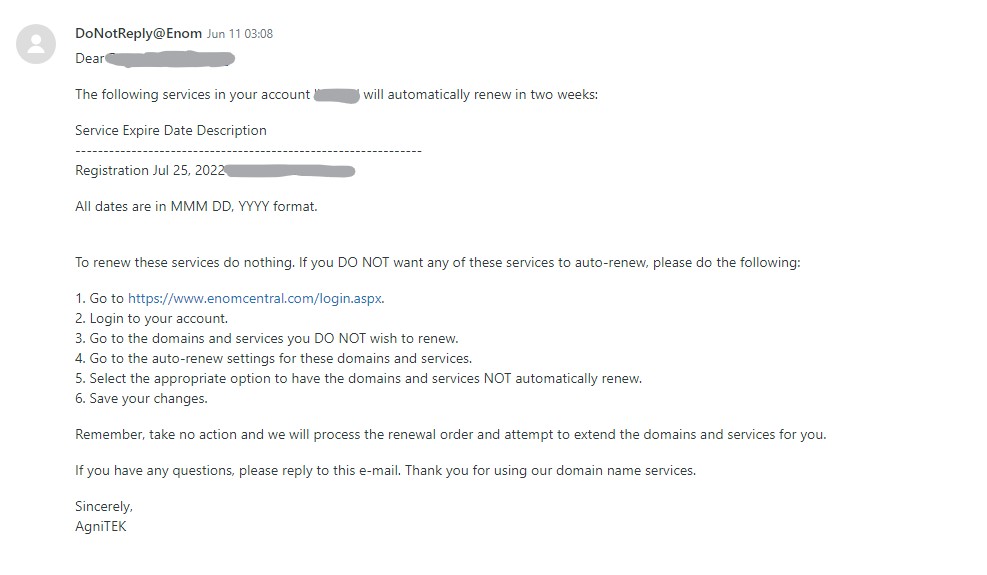
Log into your account at: https://www.enomcentral.com/login.aspx
Your credentials should be the same as the previous agnitekdomains.com website, but there is information below to recover your username or password.
1. If you’ve forgotten your username, check for emails from Enom. The emails typically indicate your username in the first sentence (ie The following services in your account ‘username’…). Their location in the emails are highlighted in yellow in the examples below.
2. If you cannot locate it, they have a recovery tool on their Enom.com website at: https://www.enomcentral.com/forgotlogin.aspx
3. If neither of those get you what you need, you can contact their support directly. Details below.
1. If you don’t know your password, you can retrieve it from their website at: https://cp.enom.com/help/SendPassword.aspx
NOTE: The password recovery ONLY works from the Enom.com site side and NOT the EnomCentral.com site.
You will have to enter a Secret Answer question also. Favorite vacation spot maybe “AgniTEK” unless you’ve updated it.
2. If you’re not able to navigate that successfully, you can contact their support directly. Details below.
Before you call, locate your renewal notification email. That will indicate the username and email address that they have on file. That email likely would have come from [email protected].
Call Enom Central (425) 974-4689 and tell them that:
- You have a “reseller retail” account that was setup originally through AgniTEK/WebUnlimited
- You are just trying to access your account through EnomCentral.com to renew your domain.
- You need their help to reset the password to gain access to your account.
2. Give them your domain name and they can lookup your username. Sometimes they are very helpful about this, sometimes not, so it’s better to have this information before you call.
3. They can tell you what email address is setup on the account also. Sometimes they are very helpful about this, sometimes not, so it’s better to have this information before you call.
The key is that you are just trying to get logged into their website, EnomCentral.com, to renew a domain name. They are usually very helpful with recovering a password.
Their phone support is available 24/7 and their help center is located here: https://www.enomcentral.com/help/
We will continue to update this page if any new information comes up.
If you cannot get your information reset through them, you can email us at [email protected] to get additional professional services support for recovering your account. We cannot provide support by phone without a ticket created.